CullPix
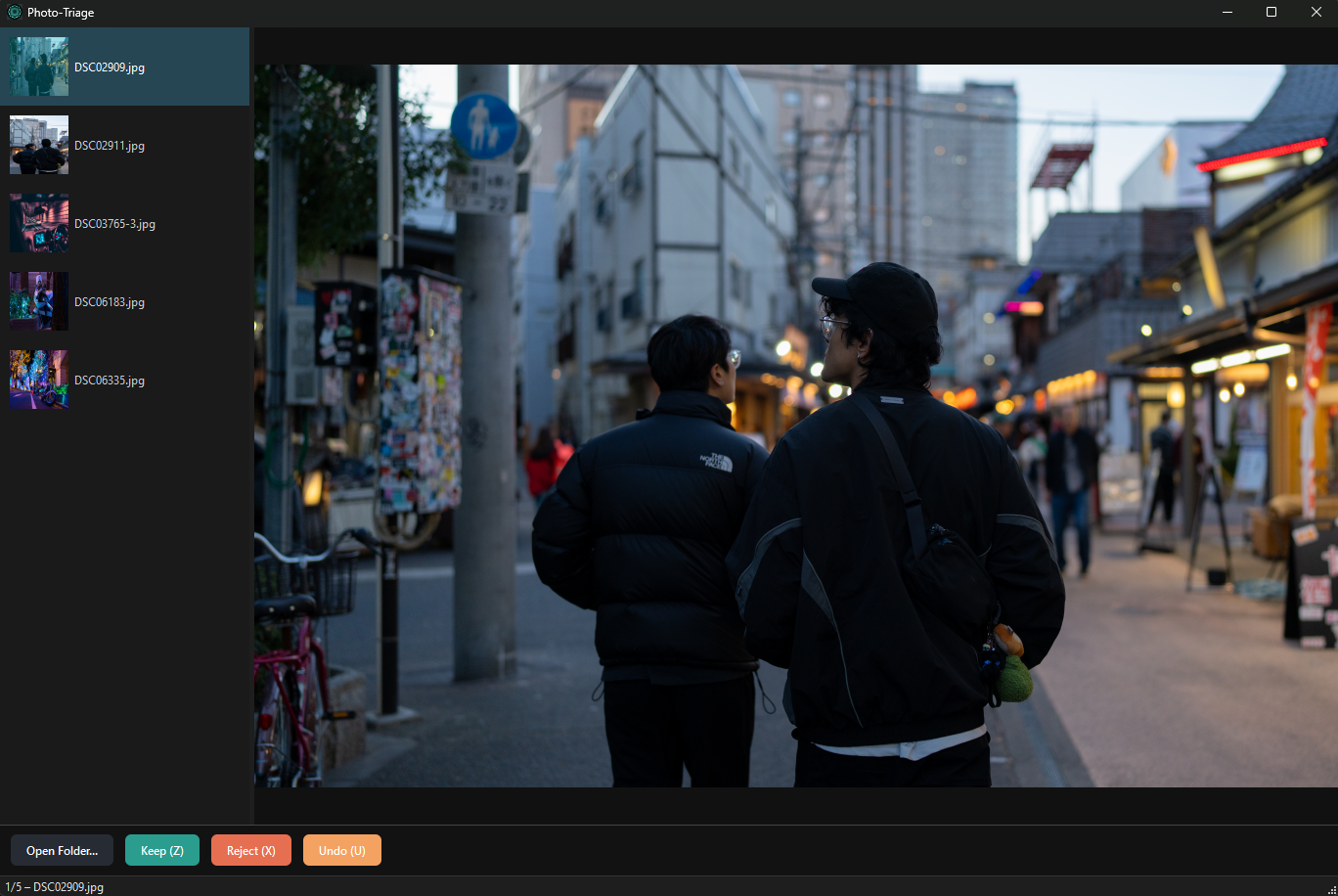
A fast app for culling photos. You open a folder, look at every shot at full size, and fire each one into the keep or reject subfolder with a single key. It's quick and straightforward.
What it does
The whole point is to triage any number of photos as fast as possible. Simple, familiar controls to keep or reject each image with hardly any lag. That's it.
Keyboard first
Z keeps, X rejects, U undoes the last move. The arrow keys just step through photos when you only want to look. After a minute it's all muscle memory and your hand barely leaves the keyboard.
It loads ahead of you
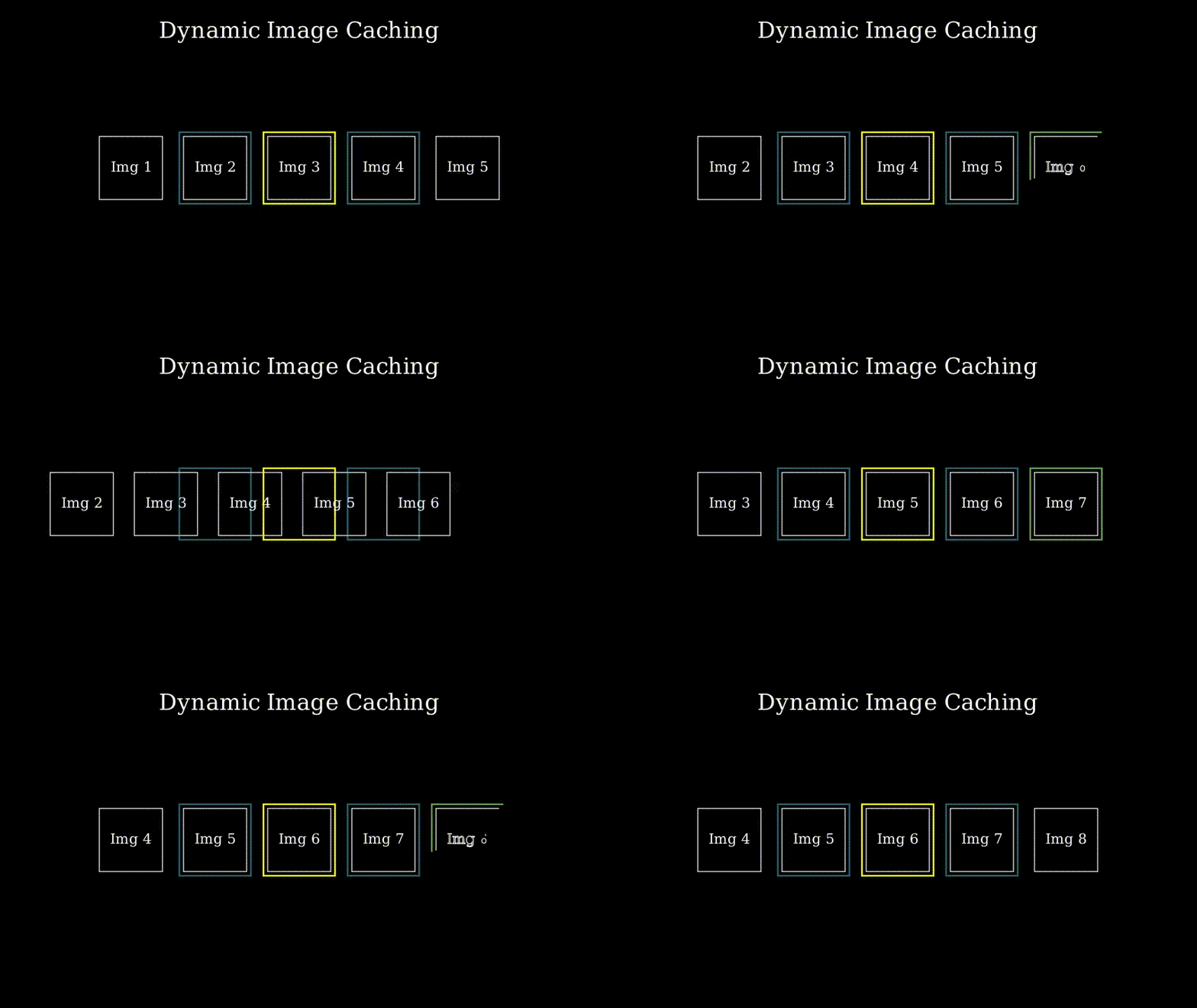
CullPix keeps a window of images cached around the one you're on, loaded on a background thread. So when you tap the arrow key, the next photo is already there. Loading off disk every single time is what the built-in OS viewer does, and that lag is the whole reason I made this.
Works with RAW
It decodes RAW files with LibRaw, so you can cull straight off the card before you ever open Lightroom. I throw 61 MP files from my Sony α7R V at it and it's smooth on my Surface Pro 11.
Nothing gets deleted
Keeps go into a 'keep' folder and rejects go into a 'discard' folder, both sitting right next to your originals. Hit U and the last file goes back exactly where it came from. You're never actually throwing anything away.
The UI doesn't freeze
Moving files and drawing thumbnails happen on background workers, so the app keeps responding while it works. My first version did the file moves on the main thread and stuttered for a moment on every keep. That bugged me enough to rewrite the whole thing.
Sorts files the way you do
IMG_2 comes before IMG_10, not after it. Sounds obvious, but most file lists sort names as plain text and scramble your shots. CullPix reads the numbers as numbers, so you go through a shoot in the order you took it.
How you drive it
- Z Keep the photo
- X Reject the photo
- U Undo the last move
- Ctrl +Z Undo the last move
- ← +→ Step back / forward
- O Open a different folder
How the cache works
The photo you're on sits in the middle of a small ring of cached images. CullPix loads a few ahead and a few behind, then drops anything that falls outside that window so memory stays small. This is the part I spent the most time on, because it's the whole reason moving between photos feels instant.
I built CullPix after a corrupted Piwigo database left me re-sorting hundreds of photos by hand in the OS viewer. I couldn't really find an app that worked the way I wanted, so I made my own. It started in Python, got way too slow, and ended up in C++. This idea began as a way for me to save a whole bunch of time while proving to myself that I could actually create something useful. What's cool is that I still use it all the time. My friend Josiah summed it up better than I could: “you had an idea, you brought it to life, and that's sick.”
Read how I built itGet CullPix
It's free and open source. You're grabbing the latest build, v0.4.0, from June 4, 2026.